Why Serial Number Errors Are So Hard to Fix in NetSuite
Serial number accuracy matters more than most teams realize, until something goes wrong.
In NetSuite, serialized inventory touches receiving, fulfillment, costing, compliance, and reporting. When a serial number is entered incorrectly, assigned to the wrong item, or tied to the wrong transaction, the impact can ripple across the system in ways that are difficult to unwind.
What starts as a small mistake can quickly become a time-consuming cleanup effort involving inventory adjustments, accounting reviews, and audit questions.
Why Serial Errors Happen in the First Place
Serial number issues are rarely caused by negligence. They usually come from operational reality:
- High-volume receiving environments
- Manual data entry under time pressure
- Refurbishment or repair workflows that require part swaps
- Devices that change identity during processing
- Legacy data imports with inconsistent formatting
In other words, serial errors are a byproduct of scale.
The problem isn’t that mistakes happen, it’s that fixing them safely in NetSuite is harder than it should be.
Where Native NetSuite Starts to Struggle
NetSuite does a good job enforcing serial number rules at the point of transaction. Once a serial number is saved, however, correcting it becomes complicated.
Native options often involve:
- Reversing inventory transactions
- Creating offsetting adjustments
- Manually editing related records
- Piecing together an explanation after the fact
These approaches work in theory, but in practice they’re risky, time-consuming, and easy to get wrong, especially when corrections need to happen at scale.
The Real Risk Isn’t the Error—It’s the Fix
The most dangerous part of serial number errors isn’t the mistake itself. It’s the workaround teams use to resolve it.
We often see:
- Direct edits with no audit trail
- Adjustments that fix inventory but confuse accounting
- “Temporary” fixes that become permanent
- Serial corrections handled outside NetSuite entirely
Each of these creates exposure, both operationally and during audits.
When teams don’t trust the fix, they stop trusting the system.
What a Better Serial Correction Process Looks Like
A safe serial correction process should do a few key things:
- Guide users through the correction
- Preserve inventory accuracy
- Maintain financial integrity
- Create a clear audit trail
- Work for both one-off fixes and bulk updates
Most importantly, it should allow corrections without requiring deep NetSuite expertise every time.
Introducing EZsuite Swap
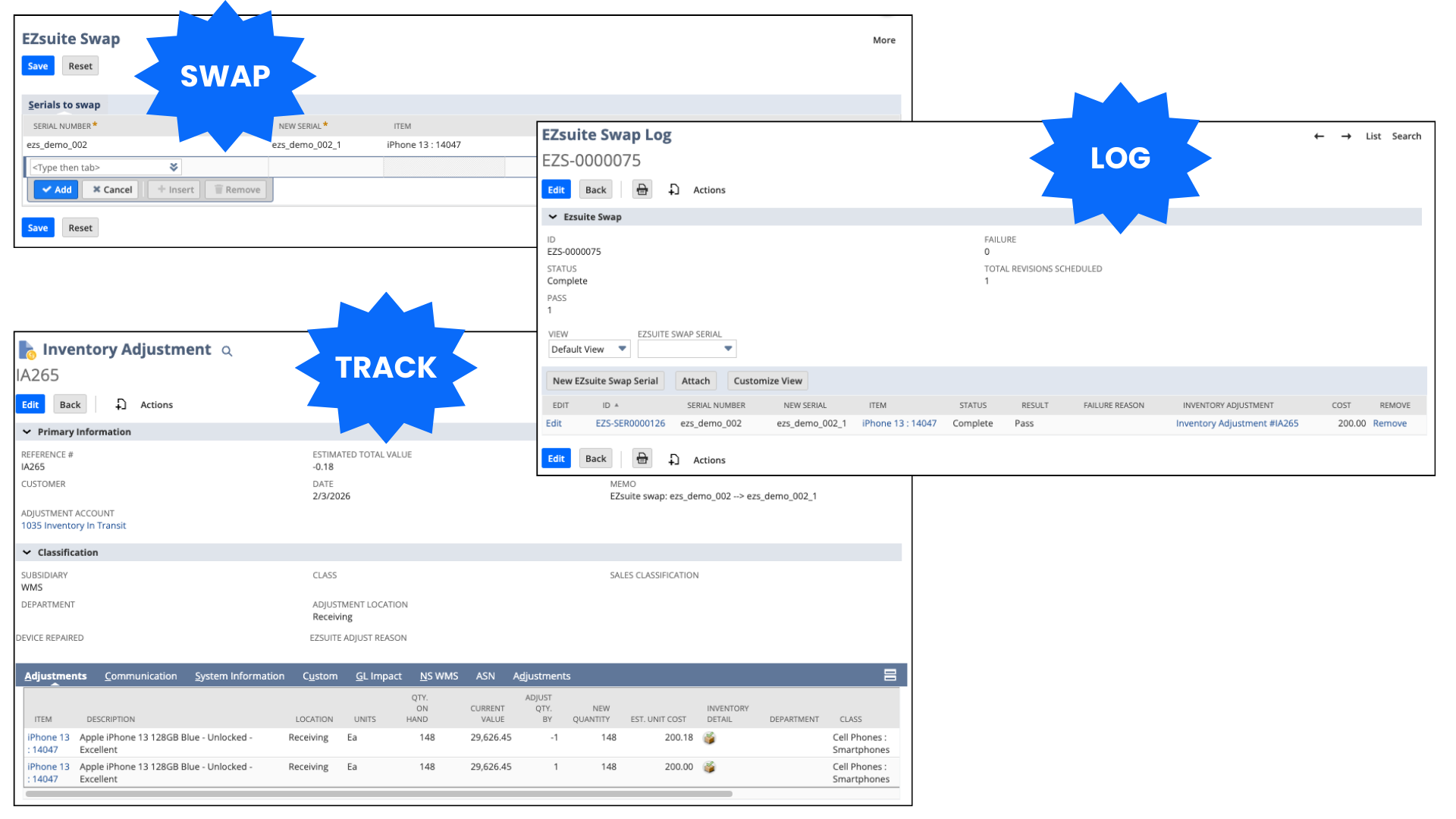
EZsuite Swap was built to turn serial number corrections into a controlled, auditable workflow instead of a high-risk workaround.
Rather than forcing users to reverse transactions or manually adjust records, EZsuite Swap provides a guided process that:
- Handles serial swaps cleanly
- Automatically creates linked inventory adjustments
- Logs every action taken
- Keeps corrections transparent and traceable
All of this happens inside NetSuite, using native records and logic.
Designed for Real-World Operations
EZsuite Swap is especially valuable in environments where serial changes are part of daily operations, not rare exceptions:
- Electronics refurbishment
- ITAD and reverse logistics
- Warehouse environments handling returns and repairs
- High-volume serialized inventory teams
In these settings, serial swaps aren’t a failure—they’re part of the workflow. The system needs to support that reality.
Final Thought: Accuracy Depends on Trust
Teams will always find ways to fix problems. The question is whether those fixes strengthen or weaken the system.
EZsuite Swap helps organizations correct serial number issues in a way that preserves trust. Trust in inventory counts, trust in financials, and trust during audits.
If serial number fixes feel risky today, it may be time to give your team a safer way to handle them.